Guides / Free
Calculation list
Every piece of a job on one list, with the weight per line and the total.
What it is for
The calculation list is the heart of MasMetal. You put every section on it with length, quantity and steel grade. The app adds up the weight live, and from here you make the cutting plan, the cut list or a quote request.
Where to find it
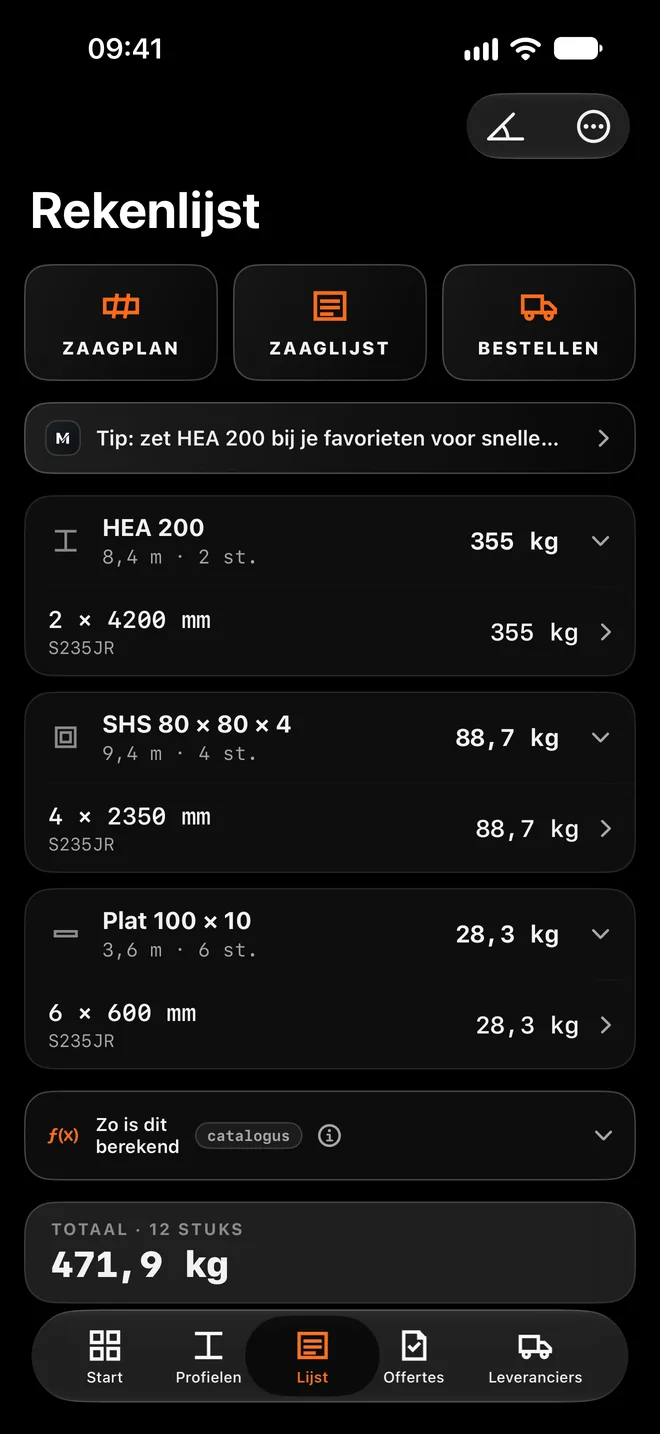
The List tab at the bottom. At the top are the CUTTING PLAN, CUT LIST and ORDER buttons.
Step by step
Add sections
From Sections with "Add to calculation list", or in the empty list with "Open the library".
Enter length and quantity
Tap a line. Enter the length and set the quantity with +1 or −1 piece. For mitres, enter the longest point; add the angles, or work them out with "Calculate in Cutting angles".
Link it to a project
Give lines a project, so you can filter, order and make cut lists per job.
Read the weight
Each section shows its subtotal, the bottom shows the TOTAL with the number of pieces. With "Include kerf loss" in Settings, the app adds a little per cut.
Carry on
CUTTING PLAN spreads the pieces over stock lengths, CUT LIST makes a PDF for the saw, ORDER sends a quote request or an order straight away.
Worked example: A railing
The calculation list from the screenshot, in S235JR.
| Section | Line | Weight |
|---|---|---|
| HEA 200 | 2 × 4200 mm | 355 kg |
| SHS 80 × 80 × 4 | 4 × 2350 mm | 88.7 kg |
| Flat 100 × 10 | 6 × 600 mm | 28.3 kg |
| Total | 12 pieces | 471.9 kg |
How the app calculates
- HEA 200: 2 × 4.2 m = 8.4 m × 42.26 kg/m ≈ 355 kg.
- Flat 100 × 10: 6 × 0.6 m = 3.6 m × 7.85 kg/m ≈ 28.3 kg.
- The total adds up the exact values, which is why it is 471.9 kg and not the sum of the rounded lines.
Tips for the best result
- Press and hold a line to duplicate it or link it to a project.
- Choose how the section lies on the saw: the dotted line in the sketch is the cut, and that is how it appears on the cut list.
- If a matching offcut is in stock, the list says "You already have this".
- With the AI scan you turn a shop drawing or hand sketch into lines in one go.
Questions
Do plates count?
In the weight, yes. In the cutting plan, no, because a plate has no cut length.
Can I share the list?
Yes, through CUT LIST as a PDF, to print or send on.