Guides / Pro
Spacing
PROBalusters spaced evenly across an opening, straight, raked or curved.
What it is for
For railings, fences and gates. You give the opening and the baluster, the app tells you how many balusters, the gap and where to mark them out. The gap next to the posts equals the gap between balusters.
Where to find it
Calculator → Spacing.
Step by step
Pick the shape
Under SHAPE: straight, raked (along a stair) or curved.
Give the opening and the baluster
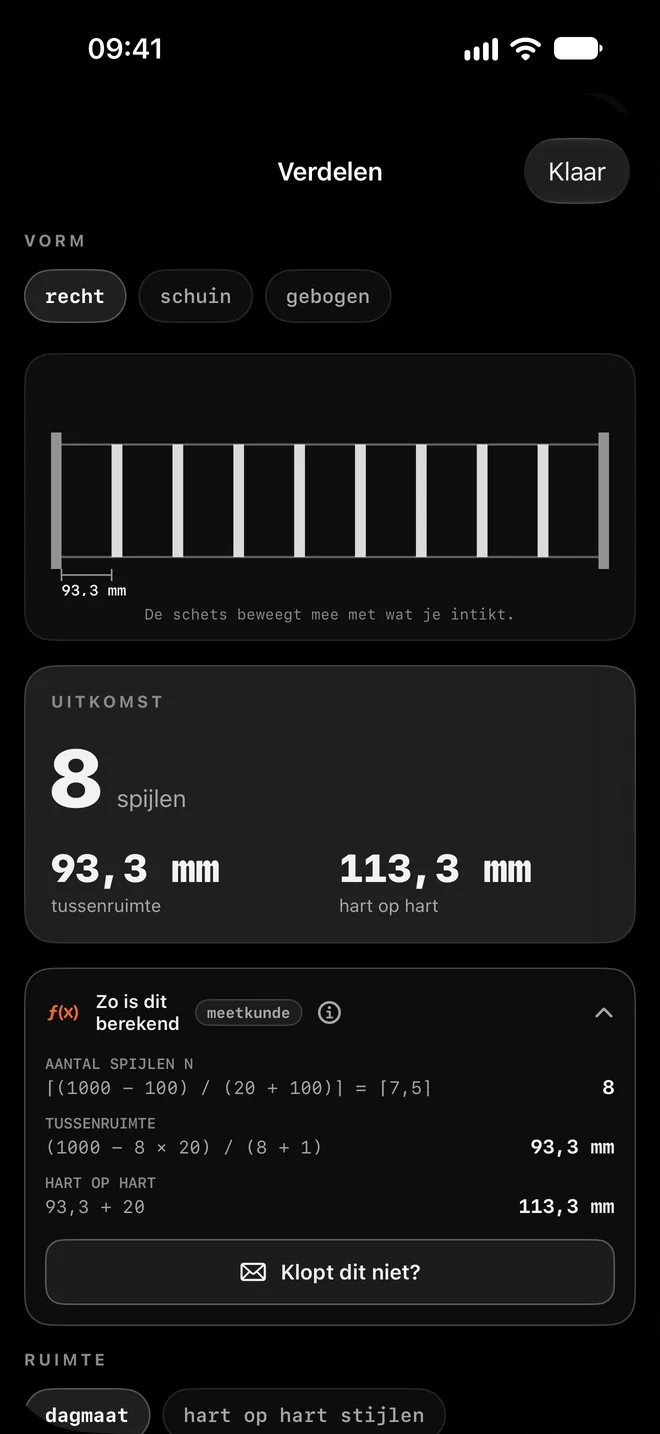
The clear space between the posts and the width of the baluster. The sketch follows along.
Fix what matters
Choose what you fix: a maximum gap (for example 100 mm), a maximum centre-to-centre distance, or an exact number of balusters.
Read the result
Under RESULT: the number of balusters, the gap and centre to centre. Open "How this was calculated" for the working.
Mark out or share
The layout list gives each position from the first post. Share it, or add the balusters to the calculation list right away.
Worked example: A 1000 mm railing
Opening 1000 mm, baluster 20 mm, gap at most 100 mm.
| What | Result |
|---|---|
| Balusters | 8 |
| Gap | 93.3 mm |
| Centre to centre | 113.3 mm |
How the app calculates
- Number = (1000 − 100) / (20 + 100) = 7.5, rounded up: 8 balusters.
- Gap = (1000 − 8 × 20) / (8 + 1) = 93.3 mm.
- Centre to centre = 93.3 + 20 = 113.3 mm.
Tips for the best result
- For a railing where children come, the app warns when the gap gets too wide.
- Raked: give the slope, or the rise and run of the stair. The distances are then along the rail.
- Choose whether the layout list measures to the side or to the centre of the baluster.
Questions
Why is the gap at the ends the same?
That way a railing looks even and every opening meets the same maximum gap.