Guides / Free
Cutting plan
Spread your cut list over stock lengths, with as little waste as possible.
What it is for
You have a calculation list with sections and lengths. The cutting plan tells you how many bars to order, which pieces you cut from which bar and what is left over. Offcuts you already have in stock are used first.
Where to find it
Calculation list → the CUTTING PLAN button at the top. The plan uses every section in the list; plates are left out, because they have no cut length.
Step by step
Fill in the calculation list
Enter the section, length and quantity per line. For mitres, enter the longest point (the outside dimension): that is how you measure on the shop floor and how the plan packs the pieces.
Tap CUTTING PLAN
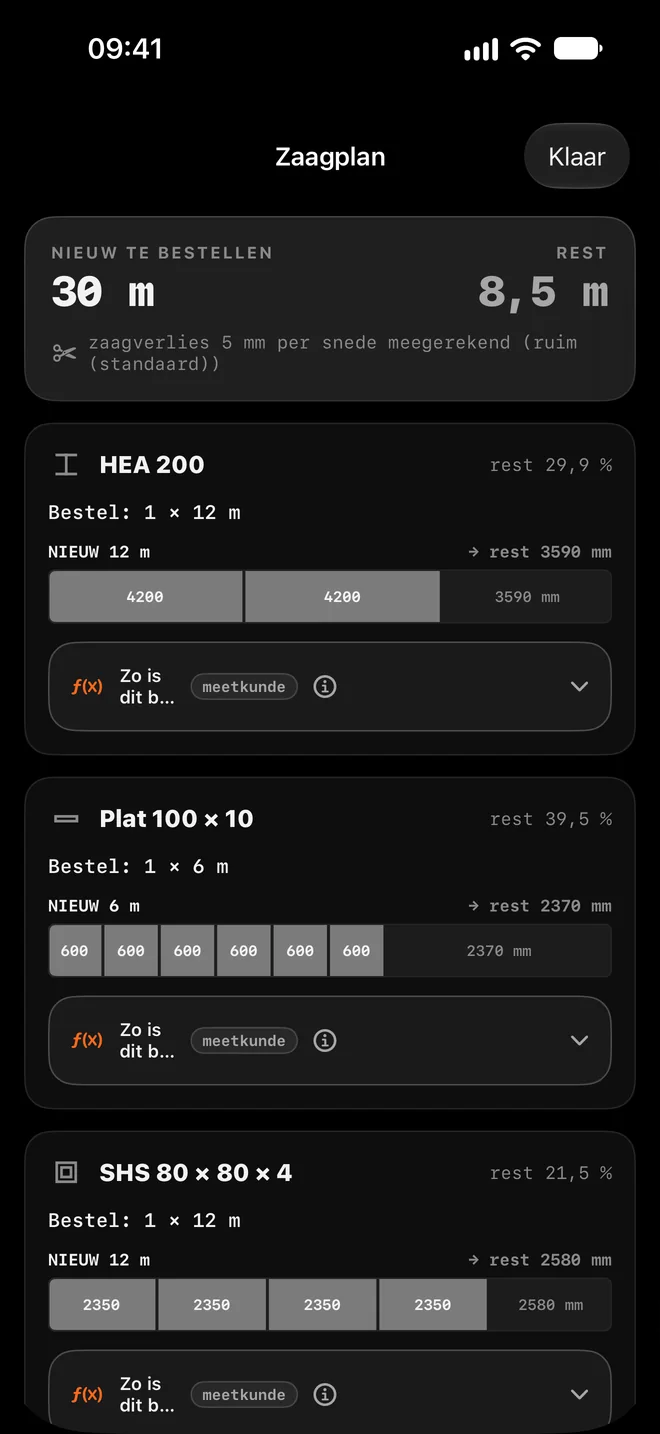
At the top you see NEW TO ORDER (all new bars together, in metres) and OFFCUT (everything that remains).
Read the plan per section
Each section shows what to order, for example "Order: 1 × 12 m". Every bar is a strip: the grey blocks are your pieces, the empty part on the right is the offcut. An offcut from your stock is listed separately.
Check how it was calculated
Open "How this was calculated" under a section. It shows the working with your own numbers, including the kerf per cut.
Share it with the shop
"Share cutting plan (PDF)" makes a PDF with every bar and cut, to print or send on.
Handle the offcuts
Tap "Process offcuts". For each leftover you choose KEEP (with its spot, for example "rack A, outside left") or RECYCLE. The app suggests, you decide. Offcuts you used are removed from stock automatically.
Worked example: A railing with three sections
This is the calculation list from the screenshot: three sections, kerf 5 mm per cut (the default).
| Section | Pieces | Order | Offcut |
|---|---|---|---|
| HEA 200 | 2 × 4200 mm | 1 × 12 m | 3590 mm |
| Flat 100 × 10 | 6 × 600 mm | 1 × 6 m | 2370 mm |
| SHS 80 × 80 × 4 | 4 × 2350 mm | 1 × 12 m | 2580 mm |
| Total | 12 pieces | 30 m | 8.5 m |
How the app calculates
- HEA 200: 12,000 − 2 × 4200 − 2 × 5 (kerf) = 3590 mm offcut.
- Flat 100 × 10: six pieces of 600 mm fit on a 6 m bar: 6000 − 6 × 600 − 6 × 5 = 2370 mm.
- The app works out two approaches (as many long bars as possible, or each time the shortest bar that fits) and picks the one with the fewest new metres.
Tips for the best result
- Set up your saw: Settings → Kerf per cut. Band saw 1.5 mm, cold saw 2 mm, cut-off disc 3 mm, generous 5 mm (default), or a custom kerf. The plan recalculates right away.
- Put your offcuts in stock. If a piece on the rack is long enough, the plan cuts from it first and you order less.
- If a piece is longer than 12 m, the plan says it does not fit: order a special length or weld it.
- If you work in feet, the plan uses 20 and 40 ft bars.
- The app suggests recycling offcuts shorter than 0.3 m or much shorter than your shortest piece.
Questions
Why does the plan sometimes order 6 m and sometimes 12 m?
For each section it picks the combination with the fewest new metres. For short pieces a 6 m bar is often enough.
Is the kerf included?
Yes, per cut, based on the saw method in Settings. The top of the plan shows which value is used.
Can I choose other stock lengths?
For now the plan uses 6 and 12 m (or 20 and 40 ft). Cutting plan 2.0, coming soon, adds advice per supplier.